West Suffolk Hospital
Trauma & Orthopaedic Registrar Handbook
Departmental overview, working patterns, eCare practical guides and key contacts — a practical reference for the T&O registrar at WSH.
Search results
Welcome
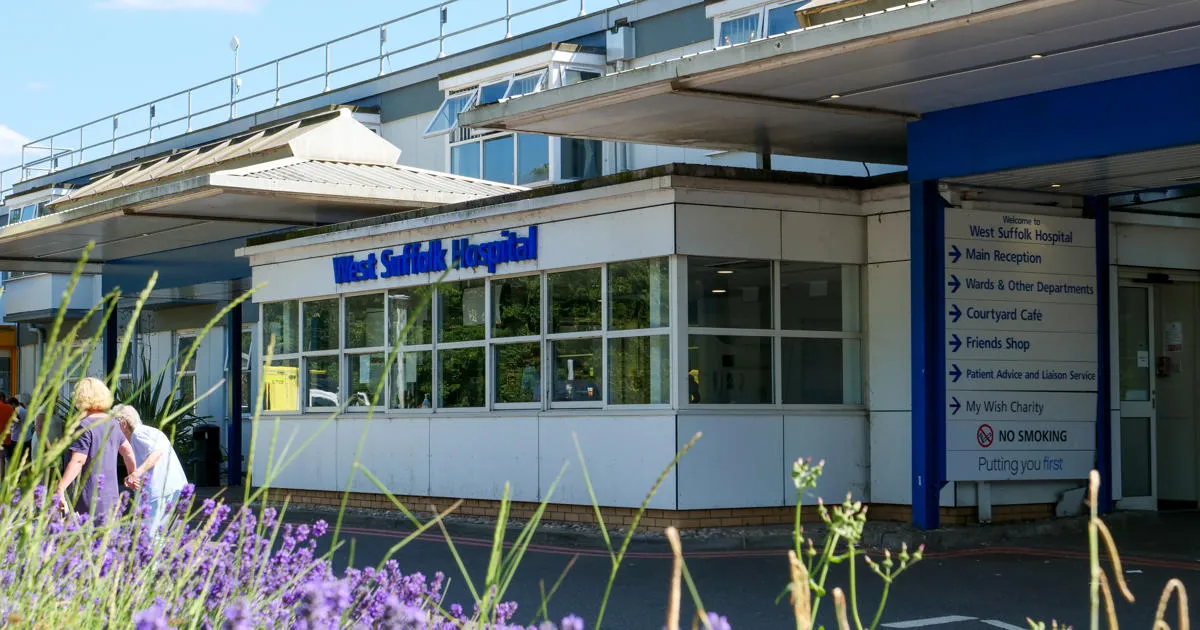
Welcome to the West Suffolk Hospital. Whilst with us there are lots of opportunities to progress both clinically and academically. You will be supported and given a mix of opportunities in theatres and clinics. As a group, we will support and prepare you for the FRCS and your life in orthopaedics.
What's Inside
Overview
Rota & Working Patterns
Clinical Activity
Resources
The Department
We are:
- 18 consultants and 1 associate specialist
- 10 lower limb arthroplasty
- 2 foot and ankle surgeons
- 5 upper limb surgeons
- 2 paediatric orthopaedic surgeons
- Spines are covered by Ipswich
Rota Co-ordinator: Debbie Loker
Subspecialty Teams
| Subspecialty | Consultants |
|---|---|
| Shoulders/Upper Limb | Ms Young · Mr Dunne · Mr Konstantopoulos |
| Hands | Mr Matthews · Ms Spalding |
| Hips | Mr Wronka · Mr Ebreo · Mr Parsons · Mr Modi · Mr Al-Hadithi |
| Knees | Mr Gill · Mr Corbett · Mr Schenk · Mr Modi · Mr Dunn |
| Foot & Ankle | Ms Thorisdottir · Mr Vaughan |
| Paediatrics | Ms Deakin |
The Wider Team
- Foundation / GP trainees on 4-month rotations covering wards & on-call
- Consultant orthogeriatrician + Registrar
- 3 trauma nurse practitioners
- 1 advanced care practitioner
- Surgical nurse practitioners
- Fracture clinic physiotherapists
- Plaster team
- Children's nurses
- Fracture clinic nurses
- Physiotherapists & Occupational Therapists … and many, many more
Surgical Care PractitionersEight nurse specialists who support clinics and theatres
| Practitioner | Specialty | Consultant(s) |
|---|---|---|
| Donna Taylor | Upper limb | LY / WM |
| Matt Mijares | Upper limb | GK |
| Josy Thomas | Hip arthroplasty | KW |
| Sara Davey | Hip arthroplasty | SP / DE |
| Sarah Reader | Hip and knee | AD / JC |
| Clare Alexander | Knee arthroplasty | JG / WS |
| Gemma Salt | Foot and ankle | PDV |
| David Higgins | Foot and ankle | VT |
Rota Composition11–12 registrars plus regional trainees and fellows
On-Calls
Consultant on-call blocks: Monday 8am – Thursday 5pm, and Thursday 5pm – Monday 8am.
During on-call, elective operations for that consultant surgeon are cancelled — but clinics continue.
Registrars work 24 hours on-call with on-call accommodation provided and a compensatory rest day the following day. There will be cross-covering of clinics to account for leave.
On-Call at NightNon-resident after 10pm
The on-calls are 24hr and non-resident after 10pm. The registrar should remain on site until 10pm and then let switchboard know to contact you on your mobile, should you choose to turn off Alertive.
As the on-calls are non-resident, an on-call room is available on site as you will be expected to be available to come into hospital if needed within 20 minutes.
There is one SHO overnight covering orthopaedics, general surgery and urology — they start at 8pm. The following day is given off as a rest day. The rota is a rolling rota and therefore is as fair as possible in terms of cover for weekends and bank holidays.
Post-10pm: all GP and A&E referrals go to the night surgical SHO.
Swaps
As there will be rest days off during the week following on-call, some regular commitments may be missed from time to time — however, due to the rolling nature of the rota the same things should not be missed all the time.
You are welcome to swap on-calls to balance your commitments. To ensure the rota is updated, please flag up any swaps to our rota co-ordinator and these can be accommodated on the rota.
Email all swaps — including the swapping registrar — to Debbie.
If you wish to take leave when you are meant to be on-call, it is your responsibility to swap out of those on-call shifts. For longer periods (e.g. honeymoons, long travel) please give as much notice as possible and discuss with the rota team.
Annual Leave
Annual leave can generally be taken when suits the individual. It is, however, important to ensure not too many SpRs are off at any one time — usually 2, but exceptions can be made if it is possible to cover all clinical work.
Leave should be booked through contacting orthopaedicsecretaries@wsh.nhs.uk. As the rota is planned 6 weeks in advance, it is necessary to give 6 weeks' notice and ensure commitments are covered.
Clinics
There are fracture clinics and orthopaedic elective clinics.
Fracture clinics are usually done with a consultant but can be SpR-led if your consultant is on leave or on call. There is usually at least one consultant in clinic should you have any queries.
You will need to cross-cover clinics occasionally to accommodate leave, post on-call etc. — this will be scheduled on Loop.
Orthopaedic elective clinics are usually not cross-covered by registrars.
Virtual Fracture ClinicMonday · Wednesday · Friday, 07:30
This is a patient-free clinic that runs on Mondays, Wednesdays and Fridays starting at 07:30, and will consist of a named consultant and fracture clinic team member.
Both A&E and GPs refer to this clinic for patient referrals. Patients are triaged to determine whether face-to-face review in clinic is required, and how soon.
Trauma Meeting08:00 — discussion room, F3/F4 corridor
Trauma meetings take place at 8am every morning in the discussion room on the F3/F4 corridor. These should be attended by everyone whenever possible.
All patients seen during the on-call, awaiting surgery, requiring results follow-up, immediately post-op, or with any concerns that need to be shared with the juniors/consultant team are included. These patients are added to this Trauma list via e-Care.
Trauma Booking
The SpR should have marked and consented the patient. They will need to book the patient for theatre by E-Care as a 'TRA' trauma case or 'EMER' emergency case.
Theatre booking paperwork
- Concentric consent form
- Pink WHO checklist form — MANDATORY, and will delay theatre cases if not filed
Both must be done along with EPARS and VTE for the patient to be transferred to theatre for surgery.
Theatres
| Theatre | Use | Hours |
|---|---|---|
| Theatre 3 | Emergency — shared with all surgical specialties | 24 / 7 |
| Theatre 7 | Elective orthopaedics | Mon–Fri · 8am – 5:30pm |
| Theatre 8 | Trauma theatre | Weekdays 8am – 5:30pm · Weekend varied |
| Theatre 9 | Elective orthopaedics | Mon–Fri · 8am – 5:30pm |
| Day Surgery Unit (DSU) | Elective / planned trauma facility | Varied sessions |
Wards
| Ward | Purpose |
|---|---|
| F1 — Rainbow Ward | Paediatrics |
| F3 | Trauma |
| F4 | Elective (need MRSA −ve swab) |
| F6 / F7 | General surgical / surgical outliers wards |
eCare Quick ReferenceStep-by-step guides for the most common SpR tasks
Create a Trauma List
- In PowerChart, go to
Patient Liston the 2nd top bar. - Click the spanner icon.
- Select New.
- Select Care Team.
- Pick "Trauma List" under
*Care Team. - Leave
Discharge Criteriaas None — otherwise you will not be able to see patients on the trauma list after they have been discharged from ED.
Create a Consultant Inpatient List
Follow steps 1–3 above (Patient List → spanner → New), then:
- Select Provider Group instead of Care Team.
- Select your consultant's name under
*Clinical Staff Groups. - Select Inpatient in
Encounter Types. - In
Discharge Criteria, select "Only display patients that have not been discharged".
Add Patients to a List
- Click Patient on top of the screen.
- Go to
Add patient to a patient liston the dropdown menu. - Click the list that you would like the patient to be added to.
Tip: To see the change immediately, click refresh at the right-hand top corner.
Maintain the Trauma ListBest done daily by the on-call registrar
- Go to
Doctors lists'on the 2nd top bar. - Click Establish Relationships — otherwise you will see shaded grey in some patients' This Visit Problems or Jobs.
- Click Select All.
- There are 4 columns in Doctors lists': Patient · Jobs · This Visit Problems · Location.
- To customise the columns, click the 3 lines (right-hand top corner) → Layout Configuration → tick the columns you want.
- To enter or change a diagnosis: click This Visit Problems → Problems and Diagnoses → Add (or Modify once highlighted). Also accessible via the left-hand menu
Problem and DiagnosisorVisit Summary. - Edit the "Display As" field and write which side — this is what actually appears on Doctor Lists'.
- Click Jobs to type in what needs to be done.
Print a Patient Liste.g. the Trauma List
- Go to
Doctors lists'on the 2nd top bar. - Make sure Trauma list is selected on the left-hand side.
- Click the 3 lines (right-hand top corner) → Print.
- In Print Options, select Simplified and Select all, then click Print at the bottom.
- A Doctors Worklist is generated in DiscernReport View.
- Select the Preview icon.
- In the top bar of Print Preview, select the landscape icon.
- Select Print → highlight F3WARDA printer → click Preferences.
- Go to Layout → select "Flip on short edge" to print double-sided.
- Select the number of copies and click Print.
Admit a Patient for TheatreTrauma or elective patients
On eCare
- EPARS — must be SpR or above
- VTE assessment
- VTE prophylaxis
Paper forms
- Consent
- WHO checklist
EPARS
- Select
Request/Care Planson the left-hand side menu. - Click + Add.
- Type "EPARS" in the Search box.
- Select "For CPR" or "DNACPR" — and fill in the details if DNACPR is selected.
VTE Assessment
- Select
Request/Care Planson the left-hand menu, click + Add. - Type "VTE" in the Search box and select "VTE assessment (once only)".
- Fill in the details.
VTE Prophylaxis
- Select
Request/Care Planson the left-hand menu, click + Add. - Type "VTE prophylaxis" in the existing list.
- Select Support devices and/or Tinzaparin — enter the dosage when ticking Tinzaparin (4500 units for normal weight).
WHO Checklist
Complete the WHO surgical safety checklist on the paper form provided. Hand it to theatre staff alongside the Concentric consent form prior to transfer.
List a PatientFor the trauma or elective list
- Select
Request/Care Planson the left-hand menu, click + Add. - Type "tra Exe" in the Search box and select "(TRA) Exeter Trauma Stem" (TRA = trauma).
- Fill in the details.
- For elective patients, type the name of the procedure directly.
Clinic Preparation
- Go to Home on the 2nd top bar.
- Type the consultant's name in
Resourceand choose the date. - Two columns will show: Name and Comments. In Comments, right-click the space and select Modify.
- Click Details and type whether the patient should have XOA or COA. (For a new patient you can enter anything in Details.)
Search Operation Notes
- Go to
Document Searchin the left-hand menu. - Type "operation" in the Keyword field.
Tip: Clinic photographs can be found in Clinical Photography on the left-hand menu.
Overnight Microbiology ServiceUpdated 6 January 2020
Joint aspirates
- Request samples on eCare and print 2 forms.
- Collect sample in 2 separate sterile universals. Remember to fully label both bottles.
- Contact Addenbrooke's Microbiology as per flowchart and send one bottle with a request form to Addenbrooke's.
- Take the other bottle and request form to the WSH laboratory specimen reception, and place in the "urgent microbiology box"; the WSH Microbiology laboratory will examine the sample for crystals the following morning.
- If it is only possible to collect one sample and an urgent microscopy and culture is needed overnight but crystal microscopy is also required, write clearly on the request form "Return to WSH for crystals".
- Note: there is only routine return transport from Addenbrooke's to WSH on Monday–Friday (excluding Bank Holidays).
- Any aspirates that are put into blood culture bottles should remain at WSH.
Orthopaedic revision tissues
On the rare occasions where these are performed overnight, please do not routinely send all the samples to Addenbrooke's for processing:
- The revision tissues and any aspirates that are put into blood culture bottles should remain at WSH.
- Any pus or aspirates that are put into sterile universal containers can be sent to Addenbrooke's for an urgent Gram stain.
Referral Pathways
| Specialty / Pathway | Where | System |
|---|---|---|
| Spines | Ipswich | referapatient -> Ipswich Hospital -> Spinal Surgery |
| Pelvic & Acetabular Trauma | Cambridge University Hospitals (CUH) | referapatient —> Addenbrookes Hospital -> Complex Orthopaedic Trauma |
| Traumatic Head Injuries | Cambridge University Hospitals (CUH) | ORION |
| Bone & Soft Tissue Tumours | Royal National Orthopaedic Hospital (Stanmore) | EpicCare |
Referring to Stanmore (RNOH) via EpicCare Link
All referrals to the Royal National Orthopaedic Hospital (Stanmore) — including the sarcoma service — are made through EpicCare Link. You will need a registered account before you can submit a referral.
To set up an account, go to the EpicCare Link sign-up page and follow the steps below based on the type of access you need.
How to set up an account
- On the sign-up page, choose "Request New Account".
- Choose "Add a user to an existing site".
- You will then see six account-type options. Because RNOH is on an Epic Connect model with UCLH, some of the options will be for UCLH — pick the one that matches the access you need (see the table below).
Account types
| Option | Who it's for |
|---|---|
| RNOH Referrer | For clinicians who need to send referrals in urgent circumstances to the RNOH. Does not give full access to the patient record. |
| UCLH Referrer (Neurophysiology) | For clinicians referring Neurophysiology patients to UCLH. Does not allow ordering or referrals at RNOH. |
| UCLH & RNOH Full Access | For clinicians who refer to both UCLH and RNOH and need access to the patient record. Takes several days to validate — don't choose this for urgent referrals; select "RNOH Referrer" instead. |
| RNOH Full Access | For clinicians who refer to RNOH and need access to the patient record. Takes several days to validate — don't choose this for urgent referrals; select "RNOH Referrer" instead. |
| Clinician | Read-only access to patient information at both organisations for doctors, nurses and AHPs. No referrals or order placement. |
| Non-Clinician | For admin and support staff who need to view appointment schedules and assist with site administration. No access to patient records, referrals or orders. |
What happens next?
- After you register, you'll receive an auto-reply from noreply@uclh.nhs.uk asking you to validate the email address you submitted.
- Once validated, you'll receive a second email confirming that your account application has been received.
- The RNOH Epic Care Helpdesk team will then validate your account request and, if approved, provision your EpicCare Link account.
Emergency Admissions Policy
Trauma & Orthopaedics (T&O)
- Septic arthritis.
- Osteomyelitis (excluding that related to diabetic foot ulcer and sacral pressure sore ulceration).
- Upper limb cellulitis (including hand).
- Most operable fractures (excluding upper limb fractures and fragility ankle/foot fractures that are to be managed non-operatively — these must have a documented orthopaedic plan in the notes before coming to AAU, including follow-up arrangements).
- Pelvic fractures (excluding pubic rami fractures) — ED/T&O to discuss with NCS at MTC. Admit under T&O.
- Head injuries with traumatic intracranial bleeds — ED to refer via Orion or discuss with neurosurgeons at Addenbrooke's (see appendix 1). Admit under T&O.
- Head injuries (excluding over-80-year-olds with acute medical conditions leading to a fall) (see appendix 1).
- Acute traumatic back injury — if surgery is needed, T&O to discuss with Ipswich. Admit under T&O.
- Cauda equina syndrome — T&O to discuss with Ipswich. Admit under T&O.
- Acute back pain is otherwise admitted under medicine (discitis, metastatic cord compression, sciatica, low-energy fragility fractures).
- RTA / trauma cases (excluding thorax/abdominal injuries — admit under general surgery).
- Suspected / confirmed necrotising fasciitis (extremities only; excluding groin/axilla/perianal which are admitted under general surgery).
General Surgery
- Trauma cases with thorax / abdominal injuries.
- Cellulitis with abscess (groin, axilla, perianal; excluding extremities — admit under T&O).
Urology
- Fournier's gangrene (necrotising fasciitis of the perineum/genitalia).
Vascular
ED / General Surgery to discuss with the Vascular team at CUH. Admit under the on-call General Surgical team to F5/6 if not for intervention and a vascular plan is achievable at WSH.
- Cold white limb.
- Gangrenous limb.
- Ruptured aneurysm not for intervention.
Maxillofacial (via Ipswich)
- Cellulitis of the mouth / lip.
- Facial trauma.
Source: Trust intranet — Emergency Admissions Policy.